
MicroG
MicroG APK vs Google Play Services
Android apps use many background services to provide a smooth experience. Google Play Services is one of the most important services on many Android phones. It supports features such as location, sign-in, notifications, maps, and other APIs.
However, not every user wants to use Google’s complete service framework. Some Android users prefer a more flexible and open-source setup. MicroG offers an alternative for selected Google APIs.
MicroG is designed to help compatible Android apps work without the full Google Play Services package. It is popular among custom ROM users and people who prefer de-Googled Android systems.
In this guide, we compare MicroG APK and Google Play Services. We will look at their features, compatibility, privacy, performance, benefits, and limitations.
What Is MicroG APK?
MicroG is an open-source project that provides alternative implementations of selected Google Play Services APIs. It aims to support Android applications that expect certain Google services.
The main goal of MicroG is to provide useful Google API functionality without requiring the complete proprietary Google Play Services framework.
How Does MicroG Work?
When an app requests a supported API, MicroG can process the request through its own implementation. This allows some apps to continue working on Android systems without official Google Play Services.
Depending on the configuration, it can support services related to:
- Google account authentication
- Location
- Cloud messaging
- Device registration
- Selected Google APIs
- Application compatibility
However, MicroG does not support every Google API. App compatibility can vary between devices and Android versions.
What Is Google Play Services?
Google Play Services is Google’s proprietary framework for Android devices. It provides APIs and background services that many applications use.
Unlike MicroG, Google Play Services is developed and maintained by Google. It is commonly included on Android devices that ship with Google’s mobile services.
Main Functions of Google Play Services
Google Play Services supports many features used by Android apps, including:
- Google Sign-In
- Location services
- Push notifications
- Google Maps features
- Account-related services
- Security features
- Advertising APIs
- Other Google APIs
Because many developers build apps around these APIs, Google Play Services offers broad compatibility across supported Android devices.
MicroG vs Google Play Services: Key Differences
The biggest difference between MicroG and Google Play Services is their development model and level of integration.
MicroG uses an open-source approach. Google Play Services uses proprietary Google technology.
Quick Comparison
| Feature | MicroG | Google Play Services |
|---|---|---|
| Source | Open source | Proprietary |
| Developer | Community project | |
| API support | Selected APIs | Broad Google APIs |
| Custom ROM support | Common on supported systems | Depends on ROM |
| Installation | May require setup | Often pre-installed |
| Customization | More flexible | More integrated |
| Compatibility | Depends on the app | Generally broad |
The two options can provide similar functions in some areas, but they are not identical.
MicroG vs Google Play Services for Privacy
Privacy is one reason some users consider MicroG. The project provides an alternative way to access selected Google APIs without installing the complete Google Play Services framework.
Using MicroG can reduce the number of Google components on a device. However, it does not automatically make every app private.
What Should You Know About Privacy?
An app can collect data through its own servers and systems. Removing Google Play Services does not stop an application from collecting information.
Users should also check:
- App permissions
- Location access
- Network activity
- Installed applications
- Account connections
- ROM settings
Google Play Services is closely connected to Google’s ecosystem. MicroG can give users more control over which service components they install.
MicroG and Android Performance
Some users choose MicroG because they want a lighter Android setup. It can allow users to install only the components they need.
The actual performance difference depends on the device, Android version, ROM, and installed applications.
Factors That Affect Performance
Performance can depend on:
- Device hardware
- Android version
- Number of installed apps
- Background services
- ROM optimization
- Service configuration
MicroG may work well on some lightweight Android setups. However, users should not assume that it will always make a phone faster.
Google Play Services has deep system integration on supported devices. This can make it convenient and reliable for applications that depend on Google’s framework.
MicroG Compatibility With Android Apps
Compatibility is an important factor when comparing MicroG with Google Play Services.
MicroG supports many commonly used Google APIs, but some apps may require services that it does not fully implement.
Common Compatibility Issues
Users may experience:
- Login errors
- Missing notifications
- Location problems
- App crashes
- Missing Google features
- Account synchronization issues
Some apps may work normally. Others may work with limited features.
Google Play Services generally provides the APIs expected by apps designed for Google’s Android ecosystem. This gives it broader compatibility in many cases.
MicroG for Custom ROMs
Custom ROMs give Android users more control over their operating system. Some ROMs do not include Google applications or services.
This is where MicroG can become useful.
De-Googled Android
A de-Googled Android system tries to reduce or remove Google’s proprietary components. But doing so can affect application compatibility.
MicroG can provide selected alternatives for apps that need certain Google APIs. Some custom ROMs may also provide built-in support.
Before installing it, check your ROM’s documentation. Compatibility can depend on the exact Android build and configuration
.
Installation: MicroG vs Google Play Services
Google Play Services usually comes pre-installed on supported Android phones. Users normally do not need to configure it manually.
Installing MicroG can require more preparation.
Basic MicroG Installation
A typical setup may involve these steps:
- Check your Android version.
- Check whether your ROM supports MicroG.
- Download compatible components from a trusted source.
- Install the required packages.
- Open the service settings.
- Grant necessary permissions.
- Configure available services.
- Test your important apps.
The exact process can differ between devices and ROMs.
Always avoid modified APK files from unknown websites. Use trusted sources and follow the project’s documentation.
MicroG Features and Google Play Services Features
MicroG focuses on selected Google API alternatives. Google Play Services provides a much wider collection of official Google services.
This difference affects what users can do with each option.
MicroG Features
Depending on the setup, MicroG may provide:
- Selected Google API support
- Account authentication
- Location support
- Cloud messaging
- Device registration
- Custom ROM compatibility
Google Play Services Features
Google Play Services can provide:
- Google account integration
- Location APIs
- Google Sign-In
- Push messaging
- Maps-related APIs
- Security services
- Various Google APIs
The available features can change based on the Android version and application requirements.
Advantages and Limitations
Both MicroG and Google Play Services have different strengths. Your Android setup can determine which features matter most.
MicroG Advantages
- Open-source approach
- Useful for supported custom ROMs
- Reduced dependence on Google’s framework
- Selected Google API support
- More control over system components
- Suitable for some de-Googled setups
MicroG Limitations
- Not every API is supported
- Some apps may not work correctly
- Setup can require technical knowledge
- Compatibility varies
- Some Google-dependent features may be unavailable
Google Play Services Advantages
- Broad application compatibility
- Official Google support
- Deep Android integration
- Large API coverage
- Simple setup on supported devices
Google Play Services Limitations
- Proprietary framework
- Strong connection to Google’s ecosystem
- Not available by default on some custom ROMs
- Provides less control over individual Google service components
Which Option Fits Your Android Setup?
Choosing between MicroG and Google Play Services depends on your needs.
If you use a standard Android phone with Google services, Google Play Services may already be integrated into your system. You may not need to change anything.
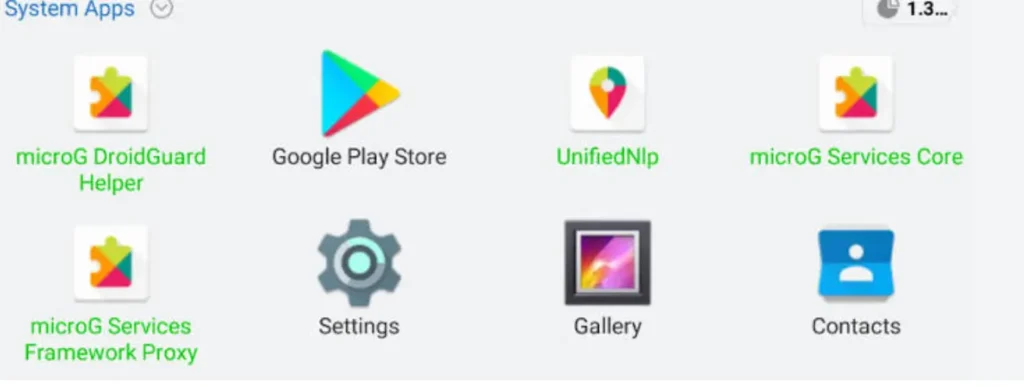
If you use a supported custom ROM or want to reduce your reliance on Google’s proprietary framework, MicroG may be relevant.
Things to Check Before Switching
Before changing your setup, consider:
- Which apps you use every day
- Whether your ROM supports MicroG
- Which Google APIs your apps require
- Whether notifications are important
- Whether you need Google account features
- How much system customization you want
Testing important apps first can help you avoid compatibility problems.
Final Thoughts
MicroG and Google Play Services provide different approaches to Android service support. Google Play Services offers broad official API coverage and deep integration with the Android ecosystem.
MicroG focuses on open-source alternatives for selected Google APIs. It can be useful for custom ROMs and de-Googled Android systems.
Neither solution works exactly the same way. Compatibility depends on your device, Android version, ROM, and applications.
Before installing MicroG, check your system requirements and the features your apps need. Use trusted sources and follow the correct setup instructions for your Android device.